Preparing your learning space...
18% through Mini Projects tutorials
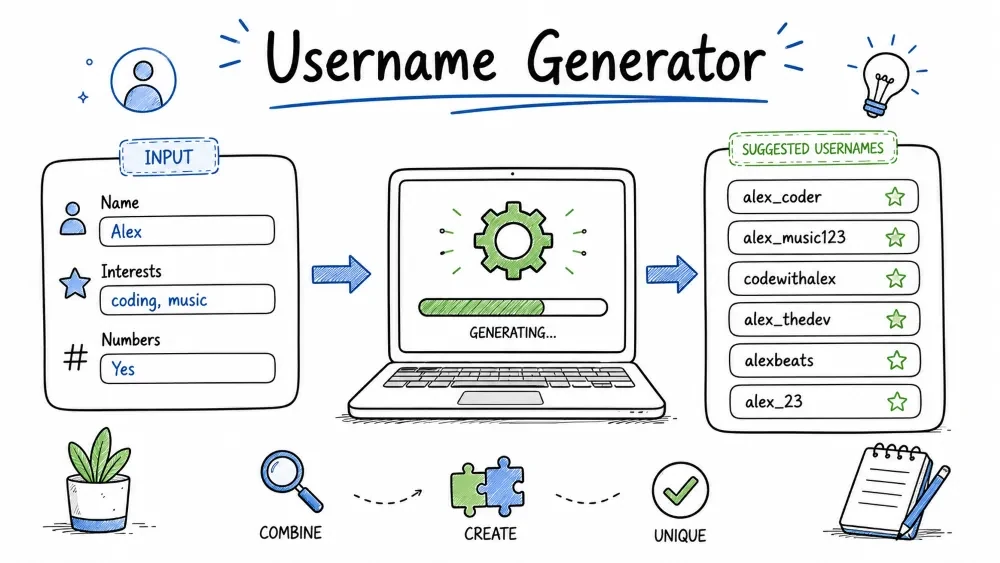
A program that creates unique, random usernames by combining adjectives, nouns, and numbers. You will learn how to work with lists, pick random elements, build strings, and write clean, reusable functions. This tool is useful for generating placeholder accounts, test data, or gamertags for games.
The Username Generator takes two word lists — adjectives and nouns — picks one word from each at random, optionally appends a number, and produces a string like HappyTiger42. The user can request multiple usernames at once and control whether numbers or separators are added.
Where this is used in the real world: Every web app with user accounts needs a username generator. Social media sites use them for suggested handles. Game platforms use them for default gamertags. Testing teams use them to create hundreds of fake accounts for load testing.
Knowledge needed
for loopsimport statementSoftware needed
UsernameGenerator/
│
├── main.py      # The generator program
└── README.md    # This tutorial
mkdir UsernameGenerator
cd UsernameGenerator
Create a new file called main.py.
We need lists of adjectives and nouns. Instead of asking the user to type them (which would be tedious), we define them inside the program.
import random

adjectives = [
    "Happy", "Brave", "Clever", "Cool", "Crazy",
    "Fast", "Fierce", "Gentle", "Jolly", "Lucky",
    "Quiet", "Shiny", "Silly", "Smart", "Wild"
]

nouns = [
    "Tiger", "Panda", "Eagle", "Dolphin", "Falcon",
    "Lion", "Wolf", "Bear", "Fox", "Hawk",
    "Otter", "Raven", "Shark", "Whale", "Zebra"
]
Why two lists: A good username combines two unrelated words. Adjectives describe (Happy, Brave) and nouns name an animal or thing (Tiger, Panda). Keeping them separate means we get 15 × 15 = 225 combinations before adding numbers. 15 adjectives × 15 nouns × 90 possible numbers = 202,500 unique usernames.
Why capital letters: Starting each word with a capital letter makes the final username look like a proper name (HappyTiger) instead of two lowercase words run together (happytiger). The capital letters act as visual separators — this is called "PascalCase" or "UpperCamelCase".
How the list + random combination works:
adjectives = ["Happy", "Brave", "Clever", ...]    (15 words)
nouns      = ["Tiger", "Panda", "Eagle", ...]      (15 words)

random.choice(adjectives) → "Happy"
random.choice(nouns)      → "Tiger"
        ↓          ↓
    "Happy" + "Tiger" + random number (10-99)
        ↓
    "HappyTiger42"
A function is a reusable block of code. Instead of writing random.choice(adjectives) every time, we wrap it in a function with a clear name.
def get_random_adjective():
    return random.choice(adjectives)
def get_random_adjective(): — The def keyword defines a function. The name get_random_adjective describes exactly what it does. The empty parentheses () mean this function takes no arguments — it needs no input, it just returns a result.
return sends a value back to the caller. When you call adj = get_random_adjective(), the variable adj receives whatever return sent.
Why write a function for one line: Functions isolate behaviour. If you later decide to change how an adjective is picked (e.g., read from a file instead of a list), you only change one place in the code, not every place that needs an adjective.
Same pattern for nouns.
def get_random_noun():
    return random.choice(nouns)
Testing these functions: After writing them, you can test by adding:
print(get_random_adjective())  # e.g., "Happy"
print(get_random_noun())       # e.g., "Tiger"
Each run prints a different pair.
A number suffix makes the username more unique. Two digits gives us 90 possible numbers (10-99).
def get_random_number():
    return random.randint(10, 99)
random.randint(10, 99) — randint stands for "random integer". It returns an integer between the two arguments, inclusive. So 10 and 99 are both possible results. The range is 10, 11, 12, ..., 98, 99 — that is 90 distinct numbers.
Why not start at 0 or 1? Two-digit numbers (10-99) look more intentional in a username than single digits. HappyTiger4 looks odd. HappyTiger42 looks deliberate.
Now combine the adjective, noun, and number into a single string. Write one function that assembles all the pieces.
def generate_username(include_number=True, separator=""):
    adj = get_random_adjective()
    noun = get_random_noun()

    if include_number:
        num = get_random_number()
        return f"{adj}{separator}{noun}{separator}{num}"
    else:
        return f"{adj}{separator}{noun}"
Parameters with defaults: include_number=True and separator="" are default parameter values. If the caller does not pass these arguments, the defaults are used. This means generate_username() works with zero arguments, but generate_username(False, "_") also works.
String assembly walkthrough:
Case 1: include_number=True, separator=""
  adj = "Happy", noun = "Tiger", num = 42
  f"{Happy}{}{Tiger}{}{42}"   →   "HappyTiger42"

Case 2: include_number=False, separator=""
  adj = "Brave", noun = "Falcon"
  f"{Brave}{}{Falcon}"        →   "BraveFalcon"

Case 3: include_number=True, separator="_"
  adj = "Lucky", noun = "Panda", num = 78
  f"{Lucky}{_}{Panda}{_}{78}"  →   "Lucky_Panda_78"
f"{adj}{separator}{noun}{separator}{num}" — The f-string evaluates each {} expression and inserts the value. If separator is an empty string "", it inserts nothing — the words are glued directly.
Before adding user interaction, here is the complete generator logic:
import random

adjectives = [
    "Happy", "Brave", "Clever", "Cool", "Crazy",
    "Fast", "Fierce", "Gentle", "Jolly", "Lucky",
    "Quiet", "Shiny", "Silly", "Smart", "Wild"
]

nouns = [
    "Tiger", "Panda", "Eagle", "Dolphin", "Falcon",
    "Lion", "Wolf", "Bear", "Fox", "Hawk",
    "Otter", "Raven", "Shark", "Whale", "Zebra"
]

def get_random_adjective():
    return random.choice(adjectives)

def get_random_noun():
    return random.choice(nouns)

def get_random_number():
    return random.randint(10, 99)

def generate_username(include_number=True, separator=""):
    adj = get_random_adjective()
    noun = get_random_noun()
    if include_number:
        num = get_random_number()
        return f"{adj}{separator}{noun}{separator}{num}"
    else:
        return f"{adj}{separator}{noun}"

# Quick test — generate 5 usernames
for i in range(5):
    print(generate_username())
Run this. You should see 5 random usernames like:
HappyTiger42
BraveFalcon78
LuckyPanda13
WildEagle55
QuietShark89
Now add user interaction. Ask the user how many usernames they want and run the generator in a loop.
print("=== Username Generator ===\n")

count = int(input("How many usernames do you want? "))

for i in range(count):
    username = generate_username(include_number=True)
    print(f"{i+1}. {username}")
int(input(...)) — input() always returns a string. If the user types "5", int("5") converts it to the integer 5. If the user types "five", int("five") crashes with a ValueError. We handle that later.
range(count) — range(5) produces the sequence 0, 1, 2, 3, 4. The loop body runs 5 times.
i+1 — The loop counter starts at 0, but humans count from 1. Adding 1 converts: 0→1, 1→2, 2→3, etc.
Output when run:
=== Username Generator ===

How many usernames do you want? 3
1. BraveFalcon47
2. LuckyPanda82
3. WildTiger13
Screenshot Suggestion: Terminal showing the user entering "5" and the program printing five random usernames.
Let the user choose whether to include numbers, what separator to use, and whether to add a prefix.
print("=== Username Generator ===\n")

count = int(input("How many usernames? "))
use_numbers = input("Include numbers? (yes/no): ").lower() == "yes"
sep_input = input("Separator (leave blank for none, or use _ - .): ")

for i in range(count):
    username = generate_username(include_number=use_numbers, separator=sep_input)
    print(f"{i+1}. {username}")
How use_numbers becomes a boolean:
input("Include numbers? (yes/no): ")      # User types: "yes"
    ↓
    "yes".lower()                          # → "yes"
    ↓
    "yes" == "yes"                         # → True
    ↓
use_numbers = True
If the user types anything other than "yes" — "no", "n", "sure", "maybe", or just presses Enter — the comparison fails and use_numbers becomes False. This is a common pattern for converting yes/no input to a boolean flag.
sep_input can be any string. Common values are "" (blank), "_", "-", ".". The user could even type "+++" to get Happy+++Tiger+++42.
Protect against bad numeric input. If the user types something that is not a number, ask again instead of crashing.
def get_positive_int(prompt):
    while True:
        value = input(prompt)
        if value.isdigit():
            num = int(value)
            if num > 0:
                return num
            else:
                print("Number must be greater than zero.")
        else:
            print("Please enter a valid number.")

count = get_positive_int("How many usernames? ")
value.isdigit() — Returns True if every character in the string is a digit (0-9). "5".isdigit() → True. "five".isdigit() → False. "".isdigit() → False.
The while True validation loop: Keeps asking until the user provides valid input. This is called a "validation loop" and is a standard pattern for getting reliable user input.
Full flow:
User types: "five"
isdigit("five") → False → "Please enter a valid number." → ask again

User types: "0"
isdigit("0") → True → int("0") → 0 → 0 > 0 → False → "Number must be > 0" → ask again

User types: "5"
isdigit("5") → True → int("5") → 5 → 5 > 0 → True → return 5
import random

adjectives = [
    "Happy", "Brave", "Clever", "Cool", "Crazy",
    "Fast", "Fierce", "Gentle", "Jolly", "Lucky",
    "Quiet", "Shiny", "Silly", "Smart", "Wild"
]

nouns = [
    "Tiger", "Panda", "Eagle", "Dolphin", "Falcon",
    "Lion", "Wolf", "Bear", "Fox", "Hawk",
    "Otter", "Raven", "Shark", "Whale", "Zebra"
]

def get_random_adjective():
    return random.choice(adjectives)

def get_random_noun():
    return random.choice(nouns)

def get_random_number():
    return random.randint(10, 99)

def generate_username(include_number=True, separator=""):
    adj = get_random_adjective()
    noun = get_random_noun()
    if include_number:
        num = get_random_number()
        return f"{adj}{separator}{noun}{separator}{num}"
    else:
        return f"{adj}{separator}{noun}"

def get_positive_int(prompt):
    while True:
        value = input(prompt)
        if value.isdigit():
            num = int(value)
            if num > 0:
                return num
            else:
                print("Number must be greater than zero.")
        else:
            print("Please enter a valid number.")

print("=== Username Generator ===\n")

count = get_positive_int("How many usernames? ")
use_numbers = input("Include numbers? (yes/no): ").lower() == "yes"
sep_input = input("Separator (leave blank for none, or use _ - .): ")

print()
for i in range(count):
    username = generate_username(include_number=use_numbers, separator=sep_input)
    print(f"{i+1}. {username}")
Run the file:
python main.py
Test 1 – Default generation
Input: How many usernames? 3
Input: Include numbers? yes
Input: Separator: (press Enter — blank)
Expected: Three usernames like BraveFalcon47, LuckyPanda82, WildTiger13 (no separators)
Test 2 – With underscore separator
Input: How many usernames? 2
Input: Include numbers? yes
Input: Separator: _
Expected: Brave_Falcon_47, Lucky_Panda_82
Test 3 – No numbers
Input: Include numbers? no
Expected: BraveFalcon, LuckyPanda, WildTiger (no digits appended)
Test 4 – Zero usernames (edge case)
Input: How many usernames? 0
Expected: "Number must be greater than zero." Prompt repeats.
Test 5 – Invalid number (text input)
Input: How many usernames? five
Expected: "Please enter a valid number." Prompt repeats.
ValueError: invalid literal for int()
Trigger: User typed something that is not a number, like "five" or left it blank.
Why: `int("five")` cannot convert "five" to an integer.
Solution: Use `.isdigit()` to validate before converting, as shown in Step 9.
AttributeError: module 'random' has no attribute 'choice'
Trigger: You named your file random.py.
Why: Python looks for modules in the current folder first. Your file "random.py" shadows the built-in random module. So `import random` imports your file, not Python's random.
Solution: Rename your file to main.py or generator.py, and delete any random.pyc file in the __pycache__ folder.
Output looks like HAPPYTIGER42 (all caps)
Trigger: The word lists accidentally use uppercase.
Why: No `.lower()` or `.title()` conversion is applied.
Solution: Either use title case in the lists ("Happy" not "HAPPY") or call `.title()` on the final username.
Username always the same (seems not random)
Trigger: Running multiple times and seeing the same combination.
Why: With only 15 adjectives and 15 nouns, repeats happen. Each specific combo has a 1/225 chance.
Solution: Add more words to the lists. Or observe over 20+ generations — you will see variety.
pyperclipCustom Word Lists – Let the user add their own adjectives and nouns at the start of the program using a loop that collects words until they type "done".
Mixed Case – Randomly capitalize some letters inside the username (e.g., HaPpYtIgEr42). Use random.choice() on each letter to decide case.
Save to File – Write all generated usernames to a text file called usernames.txt using with open("usernames.txt", "w") as f:.
Minimum Length – Keep generating until you produce a username at least 12 characters long. Loop inside generate_username() and regenerate if too short.
Theme Mode – Create themed word sets (animals, space, fantasy, food) in separate lists and let the user pick which theme to use before generating.
Save your progress and earn XP for completing tutorials.
Technology
Python
Lesson group
Mini Projects
Progress
18% complete

